



UltraMailer provide a versatile solution for manage your bulk mailing list. If you want to filter your email list based on one or more certain criteria. You can using 'Filter' feature to filter anything you want.
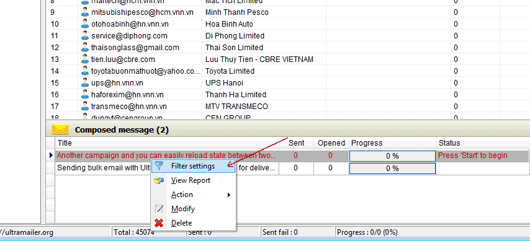
Right click on your composed message/campaign and select Filter
Right click on your composed message, select filter to setup filter condition for this campaign.
A filter setting dialog show up, select a condition you want or you can create one if you don't want to using them.

Select condition you want.
For example, i want to send this campaign for only people who using 'Gmail', so the condition Email like '%yahoo.com' is the most same.
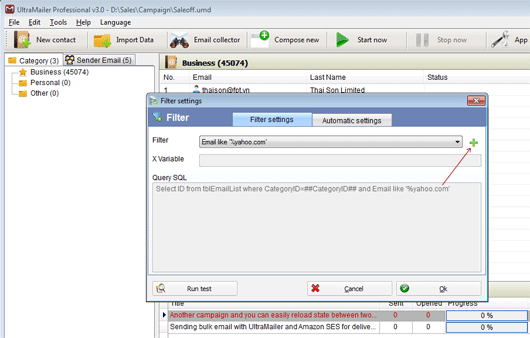
Add new filter condition.
However, this example condition is for Yahoo, so i need to edit a bit more to sending for Gmail. I need to click the add button to create a new filter condition.
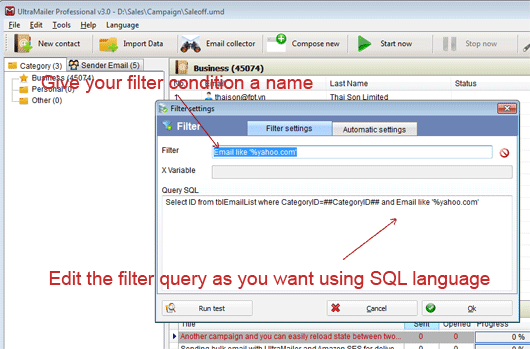
Edit the filter condition
You need to give your condition a name you want. For example, i want to send this email campaign to people who using Gmail, so the name should be Email like '%Gmail.com'. And also edit the Query to 'Gmail.com' instead of 'Yahoo.com'. And click Ok to finish.
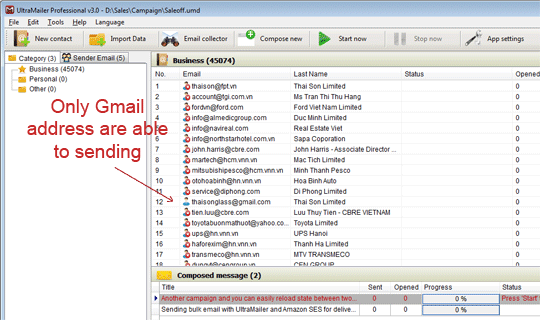
Only Gmail address are able to send
You can press Start and UltraMailer will send only to people who using Gmail.
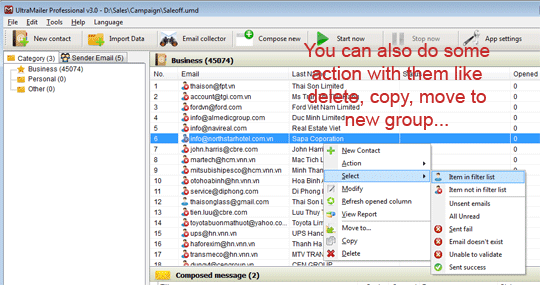
Or you can select action you want like Delete, Move, Copy
You can copy them to Excel, delete from list, move it to new group...
If you have any problem when using this feature, please contact our supporter.


